

How to Embed Editable Charts in PowerPoint Programmatically
A deep-dive on native editable charts, OOXML packaging, and chart data fidelity in generated PPTX files.
The difference between a real presentation engine and a dressed-up image pipeline often shows up in charts. If the resulting chart is not editable in PowerPoint, the workflow usually breaks the moment a stakeholder wants to tweak the data or style the slide manually.
Why are editable charts hard?
Editable charts require native PowerPoint structures, not just rendered chart images. That means the generator has to package chart definitions and supporting data in a way PowerPoint understands as real chart content.
That sounds obvious until you see how many "PowerPoint automation" tools quietly avoid the problem by flattening the chart into an image. The slide may look correct. The document is no longer behaving like a real deck.
What usually goes wrong?
Most tools fail in one of three ways:
- they rasterize the chart entirely
- they embed something PowerPoint can display but not truly edit
- they generate a technically valid chart object without preserving the data-edit workflow users expect
That last point matters more than it sounds. In finance, consulting, and SaaS reporting workflows, the recipient often needs to right-click the chart, open the data sheet, and make one last change. If that interaction is missing, the deck gets rebuilt by hand.
What makes a chart truly editable?
In practical terms, the file needs more than a visible chart. It needs:
- chart XML that PowerPoint recognizes as a chart object
- the supporting workbook or data structures behind that chart
- the relationships that bind the chart, workbook, and slide together correctly
That is why editable charts are a deeper file-format problem than "draw a bar chart."
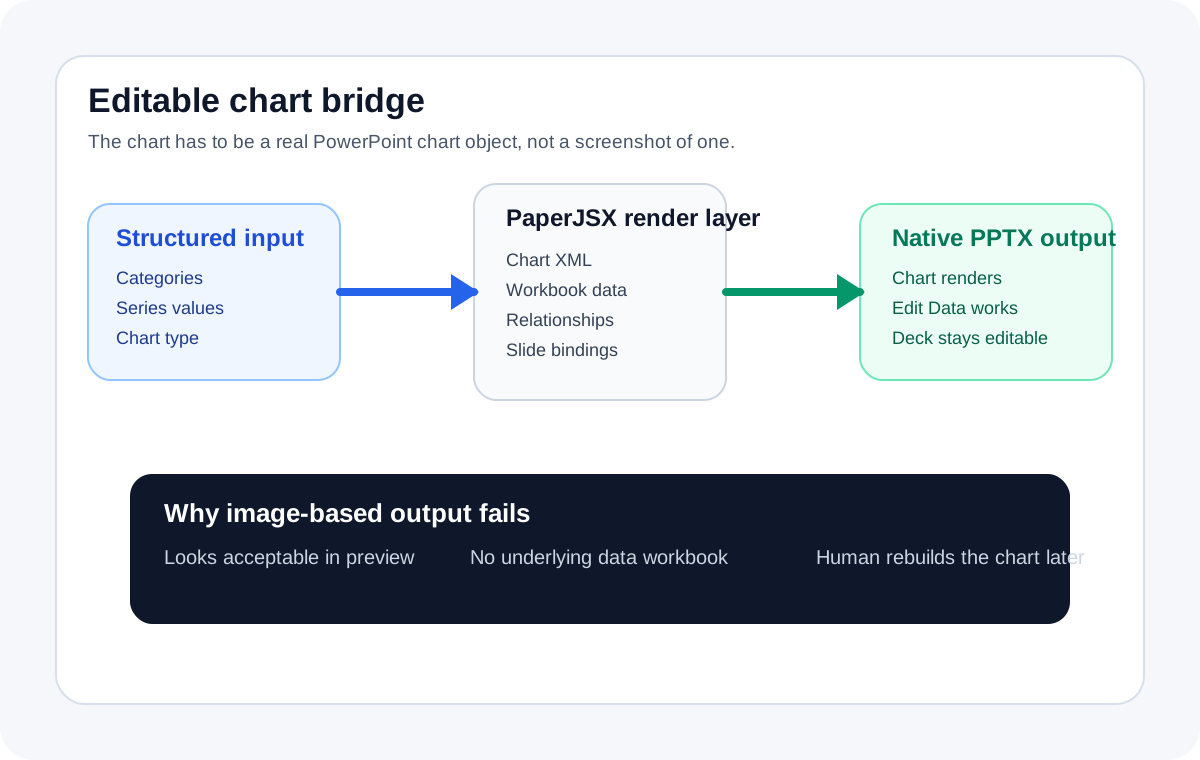
The important distinction is that the data path and the visible chart path have to stay bound together inside the PPTX. If the file only preserves the visual, the edit workflow disappears.
Why this is unusually painful in PPTX
The .pptx format is an archive of XML parts, relationships, media assets, and supporting binary data. A chart is not one thing. It is a small graph of related parts:
- the slide references a chart
- the chart references series and categories
- PowerPoint expects supporting workbook data for editability
If any of those pieces are missing or wired incorrectly, the chart may render but fail the only test the user cares about: can I edit it in PowerPoint?
A useful mental model
There are really two kinds of "generated chart" output:
- a chart-shaped visual
- a native PowerPoint chart object
The first is easy to fake. The second is what actual reporting workflows need.
How PaperJSX approaches it
PaperJSX treats chart generation as a document problem, not a screenshot problem. The goal is to create a PPTX artifact whose charts survive handoff to the human reviewer.
That means the render layer has to preserve:
- the visual
- the underlying data relationship
- the PowerPoint editing path
This is why editable charts are one of the clearest moat features in the PaperJSX category.
A representative V2 payload
The payload should describe the chart semantically, not as a pile of drawing commands:
{
  "sourceSchema": "protocol_v2",
  "document": {
    "version": "2.0",
    "title": "Q2 operating review",
    "slides": [
      {
        "slideType": "bar-chart",
        "title": "ARR by segment",
        "categories": ["SMB", "Mid-market", "Enterprise"],
        "series": [
          { "name": "ARR", "values": [1.2, 2.8, 5.4] }
        ]
      }
    ]
  }
}
The important thing here is not the JSON syntax. It is that the application is describing the business shape of the chart while the rendering layer handles the PowerPoint-specific packaging.
What should you test first?
Do not start with the fanciest chart in the company template. Start with three simple tests:
- a bar chart
- a line chart
- a pie or composition chart
For each one, verify:
- the chart opens normally in PowerPoint
- the user can access the underlying data-edit flow
- the chart still looks right after a small manual edit
That is a much stronger test than just checking whether the slide screenshot looks correct.
Why this matters beyond charts
Editable charts are usually the first place teams notice document fidelity, but they are really a proxy for a bigger question: is this system generating artifacts or just visuals?
If the chart is real, the rest of the deck is more likely to be real too.
Where this fits in the buying decision
This page matters because teams looking for editable charts are rarely browsing casually. They already know static charts are not acceptable. They are usually choosing between:
- living with image-based output
- carrying document complexity in-house
- using a generation system that treats editability as a first-order requirement
The practical next step
Generate a sample deck with one or two chart types in the PPTX Playground, then open the file in PowerPoint and test the edit flow directly. If the workflow depends on brand templates too, pair this with Using Master Slide Templates with a Presentation API.
Try PaperJSX
Generate your first editable deck from structured JSON.